While we encourage users to utilize the search function in our Knowledge Base, many prefer browsing categories to find information. To improve user experience and highlight crucial information, we’ve implemented a feature to pin important articles to the top of categories. This enhancement ensures that users can easily spot the most relevant content when browsing.
Use Case Example
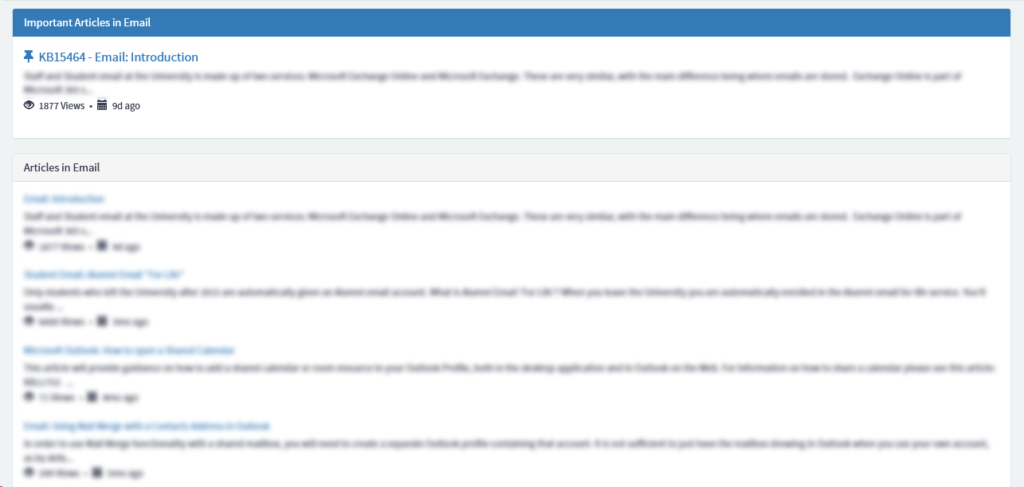
In our ‘Email’ category, we have various articles on setting up email on different devices and how-to guides for using these apps. We also have an ‘Introduction to Email’ article that explains the basics of our email system and links to all other related articles. With our new pinning feature, we can ensure this introductory article appears at the top of the list when users browse the category.
Here’s what it looks like:
Implementation
First, we added a new field to kb_article called ‘u_pinned_article’
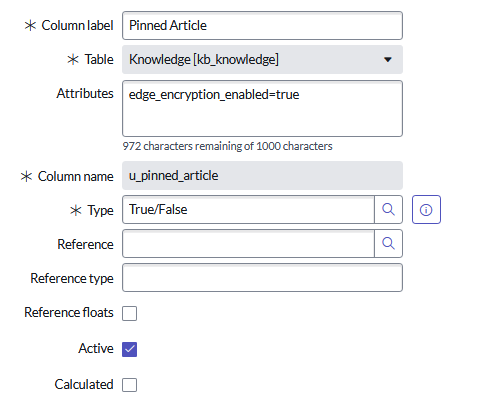
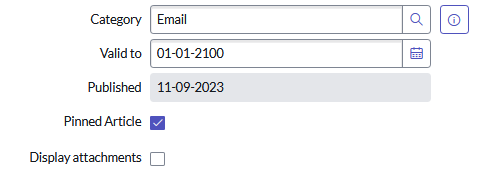
This was added to our knowledge form, and we’ve set it so that only knowledge managers (users with the ‘knowledge_manager’ role) can toggle the field, but this will vary depending on your use case.
Then you’ll need to clone the OOTB ‘KB Articles List’ widget.
IIn the HTML template of the cloned widget, add a new panel above the existing panel that shows if ‘c.data.articles.length>0’:
	<div ng-if="c.data.pinned.length>0" class="panel panel-primary b">
    <div class="panel-heading">
      <h2 class="panel-title">
       Important Articles in {{c.data.title}}
      </h2>
    </div>
    <div role="list" class="panel-body">
      <div role="listitem"
           ng-repeat="kb_article in c.data.pinned | orderBy: '-sys_updated_on'"
           class="sp-kb-topic-article m-b-lg"
           ng-include="'article_list_pinned_template.html'"
           ng-init="list_type='pinned'">
      </div>
  </div>
  </div>
As you can see, we created a new angular template at the bottom of the HTML for pinned articles:
<script type="text/ng-template" id="article_list_pinned_template.html">
<div>
<a ng-href="?id=uob_kb_article&sys_id={{::kb_article.sys_id}}&kb_id={{kb_article.kb_id}}&kb_category={{kb_article.kb_category}}" style="font-size: large;"> <i class="fa fa-thumb-tack" aria-hidden="true"></i> {{::kb_article.number}} - {{::kb_article.title}}</a>
</div>
<div style="max-height: 3em; overflow: hidden; padding-top:4px;" aria-label="{{::c.getShortenText(kb_article.text)}}">{{::kb_article.text}}...</div>
<div class="kb-about" style="padding-top:4px;">
<span class="about-outer-span">
<span ng-if="kb_article.sys_view_count == 1" class="views pad-right">
<glyph sn-char="eye-open" class="pad-right"></glyph>
${{{::kb_article.sys_view_count}} View}
</span>
<span ng-if="kb_article.sys_view_count > 1" class="views pad-right">
<glyph sn-char="eye-open" class="pad-right"></glyph>
${{{::kb_article.sys_view_count}} Views}
</span>
<span class="published pad-right">
<span class="pad-right" aria-hidden="true">•</span> <glyph sn-char="calendar" class="pad-right" aria-hidden="true"></glyph>
<sn-time-ago timestamp="kb_article.sys_updated_on"></sn-time-ago>
</span>
<span ng-if="data.showStarRating && kb_article.rating">
<span class="pad-right">•</span> <uib-rating sp-rating ng-model="::kb_article.rating" max="5" readonly="true" aria-label="${Article rating} - ${Read Only}" state-on="'fa fa-star kb-star-on'" state-off="'fa fa-star kb-star-off'" />
</span>
</span>
</div>
</script>
In the server script, in the part that handles the ‘articles’ query, add an extra else if condition for the ‘pinned’ list type:
else if (list_type == 'pinned') {
            // Query to check for pinned articles
            articles.addQuery('kb_category', data.kb_category);
            articles.addQuery('u_pinned_article', true);
        }
Add a new array for pinned articles and populate it:
    data.limit = parseInt(options.limit_article) || 100;
    data.breadcrumbs = [];
    data.most_viewed = [];
    data.top_rated = [];
    data.pinned = []; // Add this line
        data.articles = getArticles('children');
        data.pinned = getArticles('pinned'); // Add this line
Conclusion
By implementing this pinned articles feature, we’ve significantly improved the browsing experience in our ServiceNow Knowledge Base. Users can now easily identify and access the most important articles within each category, ensuring they have quick access to critical information.
This enhancement not only improves user experience but also allows knowledge managers to strategically highlight key content, potentially reducing the number of repetitive queries and improving overall efficiency.