Why I Built This
Knowledge bases age silently. Out-of-date steps, stale screenshots, and policy drift waste time and erode trust. I wanted a fast way to scan ServiceNow KB articles and flag what’s still current vs. what needs review—without moving mountains or wiring up a full platform app.
Why Not In‑Platform
I deliberately built this outside ServiceNow. Reasons:
- No new tables: I didn’t want to consume a table or manage ACLs, updates, migrations, etc.
- Quick iteration: PHP + SQLite gave me a zero‑friction loop.
- Local privacy: Assessments run on my machine with a local LLM, so article content never leaves my environment.
What I Built
A lightweight PHP 8 app that:
- Fetches article metadata and bodies via the ServiceNow REST Table API
- Stores articles and assessments in SQLite
- Uses a local OpenAI‑compatible LLM (e.g., Ollama/LM Studio) to assess freshness
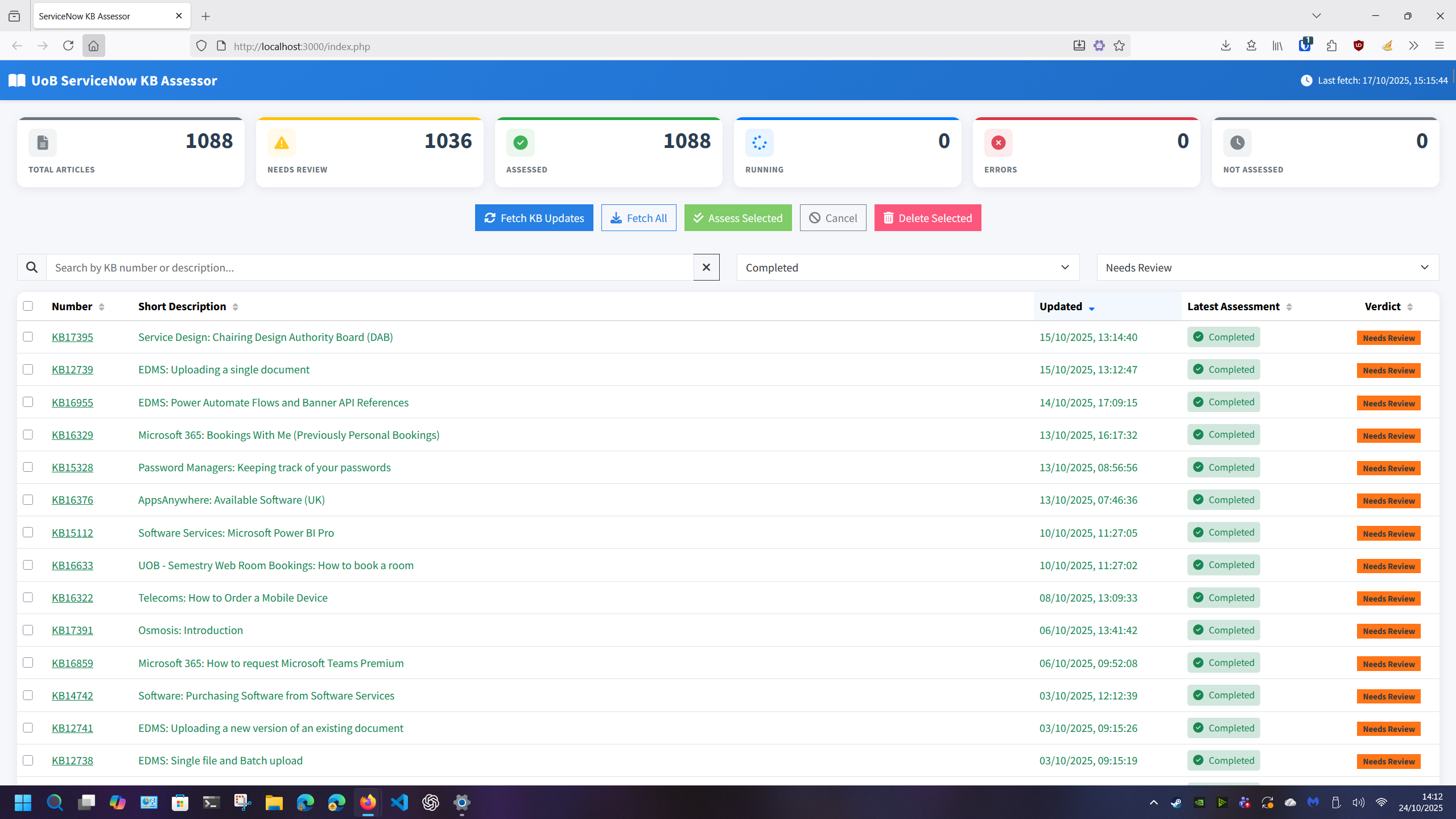
- Shows a dashboard with metrics, filters, and one‑click assessments
Architecture
- Frontend: Bootstrap, vanilla JS, small UI helpers
- Backend: PHP 8, cURL, SQLite
- Data:
- Articles table (number, short description, last updated, cached HTML body)
- Assessments table (status, timestamps, verdict, recommendations)
- Integrations:
- ServiceNow Table API (kb_knowledge) for summaries and published article bodies
- OpenAI‑compatible /chat/completions endpoint for the LLM
High‑level flow:
- Fetch updates → 2) Select articles → 3) Assess locally → 4) Store verdicts → 5) Review recommendations
How It Works
- Fetch updates
- Calls ServiceNow Table API with a configurable sysparm_query
- Paginated pulls of number, sys_updated_on, short_description
- Caches records in SQLite; re-fetch sets body_html = NULL when an article changed
- Assess selected
- For each item, fetches full published body (e.g., text field) if needed
- Sends an LLM prompt with system guidance + a JSON “user” payload:
- kb_number, short_description, last_updated, body_html
- Expects strict JSON: { verdict_current: boolean, recommendations: string[] }
- If the model returns invalid JSON, a second “repair” turn asks for valid JSON only
- Display
- Metrics cards: Total, Needs Review, Assessed, Running, Errors, Not Assessed
- Table with search, sorting, multi‑select, and quick actions
- Progress updates during assessments
The Prompt (Core Excerpt)
The system message frames the model as a peer reviewer focused on accuracy, relevance to current systems/policies, clarity, inclusivity, and structure—while ignoring platform‑specific layout:
- “Assess each article for technical accuracy, relevance to current policies, clarity, inclusivity, and structure.”
- “Focus only on written content; ignore headers/banners/templates.”
- “Treat internal ServiceNow elements (e.g., sys_attachment.do links) as valid; don’t suggest removing or reformatting them.”
- “Use plain English and only suggest improvements when there’s a concrete reason.”
- “Return ONLY a strict JSON object with keys: verdict_current (boolean), recommendations (array of short strings).”
The user message is JSON containing the article context:
- kb_number, short_description, last_updated, body_html
Expected response example:
{
“verdict_current”: false,
“recommendations”: [
“Update VPN client steps for the latest OS.”,
“Fix broken link to MFA guide.”,
“Clarify prerequisite permissions before step 2.”
]
}
This structure keeps results machine-checkable and easy to visualize.
What I Learned
- Tight prompts with explicit JSON contracts reduce cleanup work
- A second “repair” turn for invalid JSON dramatically improves success rates
- Pulling only the fields I need from ServiceNow keeps calls fast and predictable
- Simple UI wins: clean metrics + sortable table = less friction to act
If You Want To Try Something Similar
- Point at your ServiceNow instance with a narrow sysparm_query (e.g., a specific knowledge base)
- Use a local LLM endpoint (Ollama/LM Studio) or compatible API
- Start with strict JSON outputs and a repair pass
- Keep the UI simple; triage speed matters more than bells and whistles
Wrap‑Up
I chose not to build this in‑platform to avoid consuming a ServiceNow table and to keep iteration fast. The app pulls articles via the API, runs local assessments with a carefully constrained prompt, and surfaces a clear “current vs. needs review” verdict with concrete recommendations. It’s been a practical way to keep the KB honest—and focused.